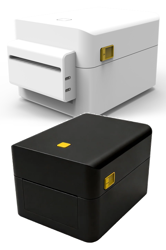
Purpose-built linerless shipping label printers that eliminate backing liner waste entirely. With more labels per roll and variable-length printing, these printers dramatically reduce downtime and material costs for e-commerce fulfillment, food service, and retail operations.
A linerless printer is specified differently from a standard label printer. The roll is wound adhesive-out, so the media path, the platen coating and the cutting method all change. The three points below are the ones that decide whether a linerless deployment works in practice.
Linerless stock has no backing paper, so labels must be separated by a cutter rather than peeled. Check that the platen is rated for direct contact with the adhesive and confirm your roll width — the JPD240D accepts 10–120 mm media at 203 or 300 dpi.
203 dpi covers shipping, logistics and retail shelf labels and allows the fastest throughput, up to 150 mm/s on the JPD240D. Move to 300 dpi when barcodes are small, when text is dense, or when the label carries fine print that must stay legible after handling.
Variable-length printing means label length is set in the print job, not by a die. A shortened label no longer requires a new roll order, which is where most of the operational saving comes from.
Direct-thermal linerless stock with an adhesive approved for the printer's platen. Because there is no liner, the roll diameter carries more usable labels than the same roll with backing paper.
Removing the liner means more labels fit on a roll of the same diameter, and it removes liner waste from the packing station entirely.
Yes. The JPD240D accepts ZPL / DPL / EPL command sets, so templates already in use can be sent to the printer without redesign.
USB, Ethernet and Wi-Fi are available, plus an integrated cutter as standard on the linerless configuration.
Our team can help you find the right solution for your application.
Contact Sales